


[Latest in November 2024] What is YouTube Shopping? A Comprehensive Guide to Its Overview, Benefits, Features, and How to Get Started!
This time, I will explain "YouTube Shopping," which is not yet widely known in Japan.
(Publication Date: January 1, 2023 / Last Updated: November 7, 2024)
What is YouTube Shopping?
As the name "YouTube Shopping" suggests, it is "a feature that allows you to promote products within YouTube."
However, some of you may be thinking, "I generally understand it, but I haven't actually seen it!" For those people, we have prepared this video, so please watch it first!
What can you do with YouTube Shopping?
You can do the following using the shopping feature:
Set up a store and link it with YouTube to showcase your own products, such as merchandise, in videos and live streams.

This seems useful for YouTubers selling original merchandise and for companies with e-commerce sites doing live commerce!
Promote products from other brands in videos, Shorts, and live streams.
This is the opposite of the above and could be used when you want influencers to introduce your products.
Unfortunately, this usage is currently not widely available in Japan, and the subscriber count requirements are strict. (More details later)
Display performance metrics for products promoted in videos, Shorts, and live streams.
As of January 2023, these metrics do not yet appear to be available in YouTube Analytics. (Not yet available in Japan?)

Understand which products viewers are most interested in.
When promoting multiple products, information such as "which product received the best response?" is definitely desirable.
Fortunately, you can see information such as which of the promoted products was most clicked in the YouTube Analytics screen!
*As of January 2023, this also appears to be unsupported.
What is the background behind YouTube's expanded shopping features?
As you all know, YouTube has a massive number of users.
Recently, short videos have been growing and seem to be gaining momentum, but in reality, YouTube's overall ad revenue is slowing down.
The fact that they are allocating resources to develop shopping features at this time suggests that there is high anticipation for YouTube Shopping as a new means to compensate for the slowing ad revenue.
Currently, it is a free feature, but considering the aforementioned background,
it is possible that at some point, a fee will need to be paid to YouTube in some form.
Incidentally, on November 16, 2022, it was reported that YouTube is working on developing "a feature that allows shopping while checking YouTube Shorts."
[Added January 2024] In the summer of 2023, integration with Shorts became possible. Please see the article below for details.
Related Article: YouTube Now Allows Product Tagging in "Shorts." Detailed Steps Explained.
Looking at recent developments, it seems that shopping-related features will continue to expand in the future.
When did it become available?
YouTube Shopping, a feature that started gaining attention around July-August 2022.
While it might seem like a newly launched feature, it actually existed before as a different function.
Its name was "Merchandise Shelf Feature."
To use the merchandise shelf feature, there were detailed requirements such as country, monetization, target audience, and number of policy violations, but the biggest hurdle was "having over 10,000 subscribers*".
*Official music artist channels were allowed even with fewer than 10,000 subscribers.
This requirement of over 10,000 subscribers was significantly eased to over 1,000 subscribers around July 2022.
[Added December 2023] Currently, this requirement has been relaxed from 1,000 to 500 subscribers. (With watch time conditions)
As a result, the number of YouTube channels meeting the usage requirements increased. *
*For promoting products from other brands, the subscriber count requirements remain strict.
Furthermore, on July 20, 2022, Shopify, one of the world's largest e-commerce platforms, announced its partnership with YouTube Shopping, which became a major topic in the Nikkei Shimbun and other media.

↑ Our CEO's creator account, which started in 2024 (as of January 27, 2024). Even with relaxed conditions, the path to being able to use shopping features is still long... but we'll do our best!
Why is YouTube Shopping gaining attention?
A new monetization method for YouTubers?

One of the monetization methods for YouTubers is "ad revenue" from video playback.
Some YouTubers have reported a decrease in ad revenue per view, and it is likely that many YouTubers are paying attention to this as a means to supplement their declining income.
By using YouTube Shopping to sell original merchandise, the purchase rate may improve compared to before.
Additionally, there is information that creators can earn commissions by selling recommended products in Shorts and regular videos, so there are high expectations for its use as an affiliate platform.
However, as mentioned earlier, in Japan, only original products can be sold at the moment, and the subscriber count requirements remain strict.
High affinity between video and e-commerce
With only images on an e-commerce site, it can be difficult to convey the atmosphere or obtain more information than what is written there at that moment.
In this regard, YouTube Shopping allows for detailed explanations of products within videos, and live commerce enables Q&A sessions.
Compensating for the weaknesses of e-commerce sites while directly linking to product pages is a significant advantage of YouTube Shopping.
The live commerce market is growing rapidly.
And this live commerce market is growing rapidly worldwide.
For example, the live streaming market in the US reached $11 billion in 2021, and sales are projected to reach $35 billion by 2024 (3.3% of all e-commerce sales in the US).
In China, it is also used as a standard tool for retail shopping culture on Singles' Day (November 11).

High YouTube usage rate
YouTube's usage rate exceeds 90% across all age groups from teens to 40s, which is overwhelmingly higher than other social media platforms like Instagram.
In business, the more users you can reach, the better.
If you can sell on a popular platform, you can expect significant sales.

Where can YouTube Shopping products be displayed?
With YouTube Shopping, products can be displayed in four main locations.
Of course, you can choose which products to display in each location.
Channel Store

Product display on video end screens

How to set it up

Product tagging in videos and live streams
Appearance
This is how it looks in a live stream.

How to set up a live stream
Select encoder streaming to start the stream.
In the live stream settings, click the "Shopping" tab to display the product list.
You can pin a product by dragging it to "Pinned Products" panel > "Pin Product".
To unpin a product and switch to the next one, click "Unpin" in the live stream preview.
Quote: YouTube Help
Is product tagging within uploaded videos not yet available in Japan?
Reference: YouTube Help
Pinning products in chat

You can also pin products in the chat section.
This feature is useful when you have a product you want to display throughout a live stream.
How to set it up
As shown below, in the YouTube live stream settings, click the "Shopping" tab to display the product list, then set the product you want to pin to the chat screen.


How much traffic can be expected from YouTube Shopping?
Many of you may be wondering, "How much impact will this have?"
So, we're sharing data from an actual live stream using YouTube Shopping!
This time, we received cooperation from Matome Sheet Style! Absolute Pass Channel [Qualification Exams / SME Management Consultant Exam Preparation] (Thank you very much!)

Prerequisites
Of course, the impact will vary greatly depending on the channel's scale, number of viewers, etc., so please keep in mind that these are figures based on the following conditions.
- Approximately 13,000 channel subscribers
- Around 80-100 concurrent viewers for this live stream
- 2 products introduced

Results
- Number of visits to the e-commerce site: Approximately 4 times higher than the same time on a normal day, at 45 visits (meaning 7-8% of viewers visited the site).
- Number of purchases during and immediately after the live stream: Approximately 8 items (a simple calculation of the conversion rate gives about 17%. This is quite high, as those who came were highly motivated to buy).
Since this is just one example, it's difficult to make a definitive statement, but it can be said that there was a measurable increase in site traffic and purchases due to the use of YouTube Shopping.
This time, the stream focused on product explanations and Q&A, without any specific announcements to encourage purchases, but it seems to have potential depending on how it's used.
Moving forward, we plan to further research the difference in results between using YouTube Shopping and not using it!
Requirements to start YouTube Shopping
The requirements for YouTube Shopping vary depending on "whose brand products you want to promote."
Usage requirements for promoting your own original products (these are the ones whose conditions have been relaxed)
The usage requirements for this have been significantly relaxed this year.
I will explain the usage requirements in order.
Eligible channel
Key channel eligibility requirements include:
-
Based in a country or region where the YouTube Partner Program is available and the channel is approved for monetization.
-
Has over 1,000 subscribers, or is an official artist channel.
[Added December 2023] Currently, this requirement has been relaxed from 1,000 to 500 subscribers.
-
The audience is not set to made for kids, and there are not many videos set to made for kids.
-
Does not have many videos that violate the monetization policies.
- Has not received any Community Guidelines strikes for hate speech.
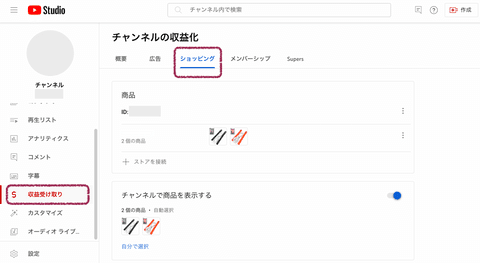
You can check if your channel meets the requirements in the YouTube Studio (YouTube's administration screen).
Select "Monetization" from the left sidebar menu in YouTube Studio, and if the "Shopping" tab is displayed, store linking is possible.
Selling products that do not violate policies
The products you intend to promote will be reviewed by Google.
Once your YouTube channel is linked to a store, products are reviewed for compliance with Google's policies and Google Merchant Center's policies.
If your products are rejected, you can also request a review of disapproved products in Google Merchant Center.
The review usually takes a few days. (In our case, it was sometimes linked within a few hours.)
Usage requirements for promoting other brands' products (not yet available in Japan)
Currently, this use case is not available in Japan, and the usage requirements remain strict....
Based in Brazil, India, the UK, or the US.
This is common with platforms like Google and Facebook: features vary by country.
There should be a demand for influencer promotions in Japan, so why is this the case?
Channel is approved for monetization. (Details)
Has over 20,000 subscribers.
Even for those in eligible countries, this part will be particularly strict. We hope that it will be relaxed for eligible countries as well in the future.
Channel is not a music channel, official artist channel, or associated with music partners. *Music partners include music labels, music distributors, and VEVO. (Details)
Channel's audience is not set to "made for kids," and there are not many videos set to "made for kids." (Details)
Does not have many videos that violate the channel monetization policies. (Details)
Has not received any Community Guidelines strikes related to hate speech, child safety, violence, dangerous content, or suicide/self-harm. (Details)
What can be sold on YouTube Shopping?
It's not as if anything can be sold.
There are the following restrictions:
Intangible products are NOT allowed.
YouTube Shopping does not allow the sale of intangible goods. This is especially important for those primarily dealing with downloadable products.
Typical examples of intangible products:

- E-books (excluding audiobooks)
- "Services" that do not have a physical form as a product
- Financial products, etc.
By the way, we had a case where a printed book was mistakenly recognized as an e-book.
Some tangible products are also not allowed.
In addition, even for tangible products, some cannot be sold due to Google's policy terms mentioned above.
However, it is unlikely that this condition will be a problem for most.
Typical examples of disallowed items:

- Tickets
- Cars
- Counterfeit goods
- Real estate
- Drugs
- Explosives, etc.
Which e-commerce sites support YouTube Shopping and what are the costs?
As of December 2022, the following four platforms can be linked to YouTube:
Only Shopify and SUZURI currently support Japanese.
Also, SUZURI only supports print-on-demand, and only Shopify allows you to sell your own original products, so
it is best to choose between these two depending on the type of product you want to sell.
[Added May 2024] As of May 21, 2024, integration with BASE is also possible.[Added November 2024] As of November 7, 2024, integration with Color Me Shop is also possible. * Requires the introduction of Google Shopping PRO (a paid option for Color Me Shop)


*Store selection screen in YouTube Studio
Shopify (Japanese language supported)
If Japanese businesses want to sell their own original products, Shopify is still recommended.
The necessary costs are as follows:
-
E-commerce site construction costs
-
Shopify monthly usage fee (from $25)
-
Payment processing fees on sales (目安: around 3.4% for credit cards)
Note: Music channels can only use the shopping features of Shopify or a supported merchandise partner.
SUZURI (Japanese language supported)
SUZURI is a platform exclusively for print-on-demand products.
It's a service that allows anyone to easily sell various goods on demand with just photos or illustrations, and its characteristic is that there are no basic fees or commissions.
If you only want to sell print-on-demand products and want to keep costs down, this option might be worth considering.
Spreadshop (Japanese language not supported)
This is a platform specifically for print-on-demand products.
Based on the help section, it appears to be free to use.
Spring (Japanese language not supported)
This is a platform specifically for print-on-demand products.
This also seems to be available for free.
Frequently Asked Questions about YouTube Shopping
Q. Will YouTube Shopping always be displayed once set up?
A. Actually, it seems unstable, appearing sometimes and not at other times, depending on the environment.
Based on our testing, here's what we've confirmed:
- It may not be displayed if you have YouTube Premium or an ad-blocking extension.
- It will not be displayed if you are not logged in to YouTube.
- If you view it many times in one day, the display may disappear.
Regarding video viewing by YouTube Premium members, as per ①, although no mention was found in the help section:
・Shopping on live streams is displayed
・Shopping on regular posts is not displayed
This seems to be the current specification (based on verification by several people).
Is YouTube Shopping positioned purely as "advertising"?
The fact that it's displayed for Premium members only during live streams suggests Google's deliberate intention.
Q. Is it possible to distinguish traffic originating from YouTube Shopping?
A. In tests conducted with Shopify integration, it was possible to identify if traffic came from YouTube Shopping using UTM parameters.
The UTM parameter "product_shelf" is assigned to medium and "youtube" to source.
One thing that caught my attention was that feeds uploaded to Google Merchant Center via Shopify already had "product_sync" in medium and "google" in source.
This is just a guess, but I imagine there's a mechanism that automatically appends UTM parameters to the end of the URL when a product is clicked on YouTube Shopping.
Currently, research is ongoing, but I hope to be able to further segment the identification to "where on YouTube Shopping the product was displayed."
Q. Can it be used on any device?
A. Based on our verification, it can be used on smartphones, PCs, and tablets.
On the other hand, while it might be a rare case, when watching YouTube on a TV, pressing the purchase button displays a QR code.

Summary
What did you think?
Some of you who read this article might be thinking about starting YouTube Shopping!
I will compile specific integration methods in a separate article.
Please note that the article content will be updated periodically.
※ [Video included] Other examples of YouTube Shopping productions can be viewed here.
Finally
We are a small production company that has just been established.
We would appreciate your support by sharing!
References